Test-Control
The Test-Control card (on the Settings tab) holds the defaults that govern how the AI agents act on the page. You can always override any of these per step by being explicit in the prompt — these are only the defaults that apply when a step doesn't say otherwise.
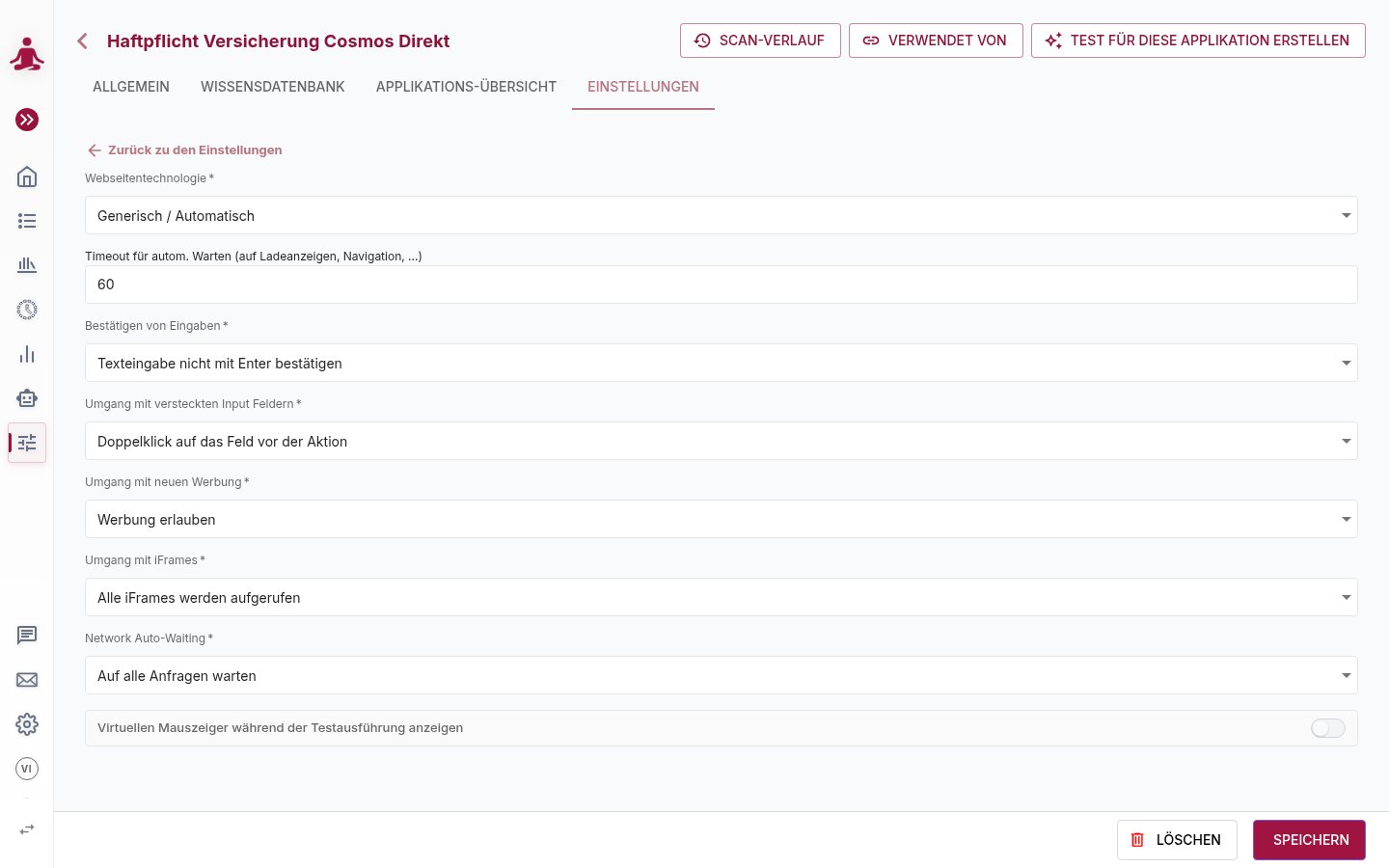
| Field | Description | Default |
|---|---|---|
| Timeout for Auto-Wait | Maximum time msg.ZenTestAI waits for the page to settle before continuing — see Automatic Waiting. | 30 s |
| Confirm inputs | Whether to automatically press enter after typing. Do not confirm text input via enter / Confirm text input via enter. | Do not confirm |
| Handling of invisible input fields | What to do when the AI must type into a field that is not directly typeable: Double click on the field before action, Click on the field before action, Focus the field before action, or Only type the value in visible input fields (skip otherwise). | Click on the field before action |
| Handling of Advertisement | Allow Ads (interact normally) or Block Ads (ignore advertisement containers). | Allow Ads |
| Handling of iframes | System Default, No iFrames (most performant), All iFrames are accessed, or iFrames are accessed by Host. The last option reveals a field where you list the iframe hosts (comma-separated) to allow. | No iFrames (most performant) |
| Show virtual cursor during execution | Render a virtual cursor so people watching a recording can follow what the agent is doing. | off |